Class ReplaySubject<T>
- Type Parameters:
T- the value type
- All Implemented Interfaces:
ObservableSource<T>, Observer<T>
Observers.
This subject does not have a public constructor by design; a new empty instance of this
ReplaySubject can be created via the following create methods that
allow specifying the retention policy for items:
create()- creates an empty, unboundedReplaySubjectthat caches all items and the terminal event it receives.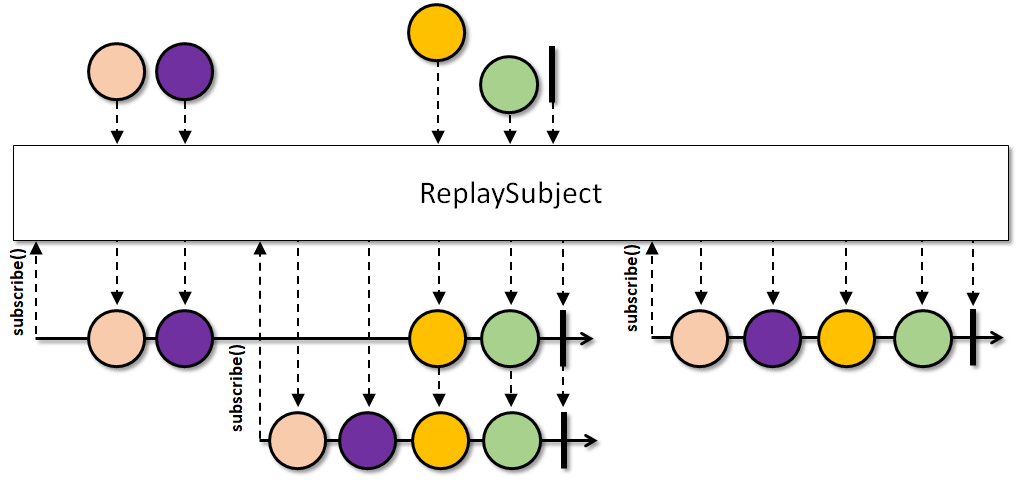
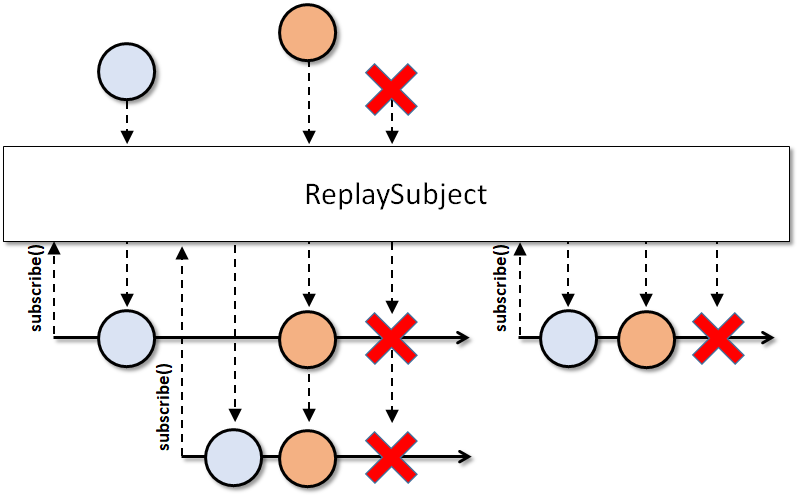
create(int)- creates an empty, unboundedReplaySubjectwith a hint about how many total items one expects to retain.createWithSize(int)- creates an empty, size-boundReplaySubjectthat retains at most the given number of the latest item it receives.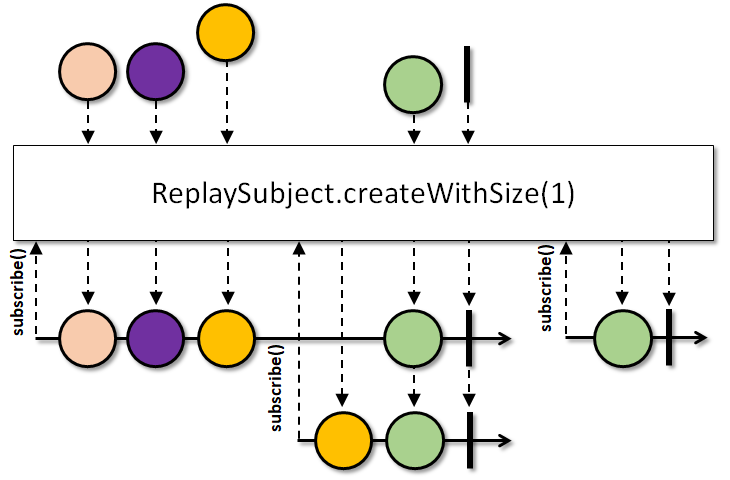
createWithTime(long, TimeUnit, Scheduler)- creates an empty, time-boundReplaySubjectthat retains items no older than the specified time amount.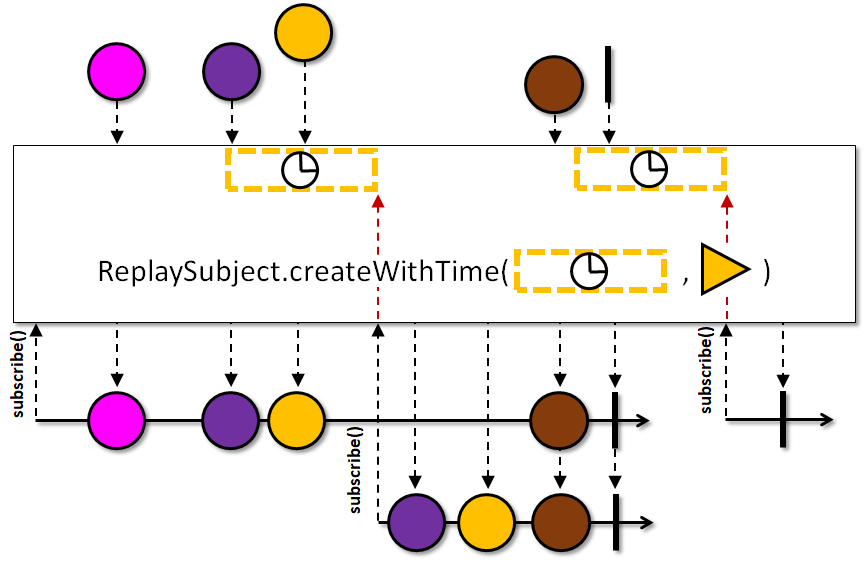
createWithTimeAndSize(long, TimeUnit, Scheduler, int)- creates an empty, time- and size-boundReplaySubjectthat retains at most the given number items that are also not older than the specified time amount.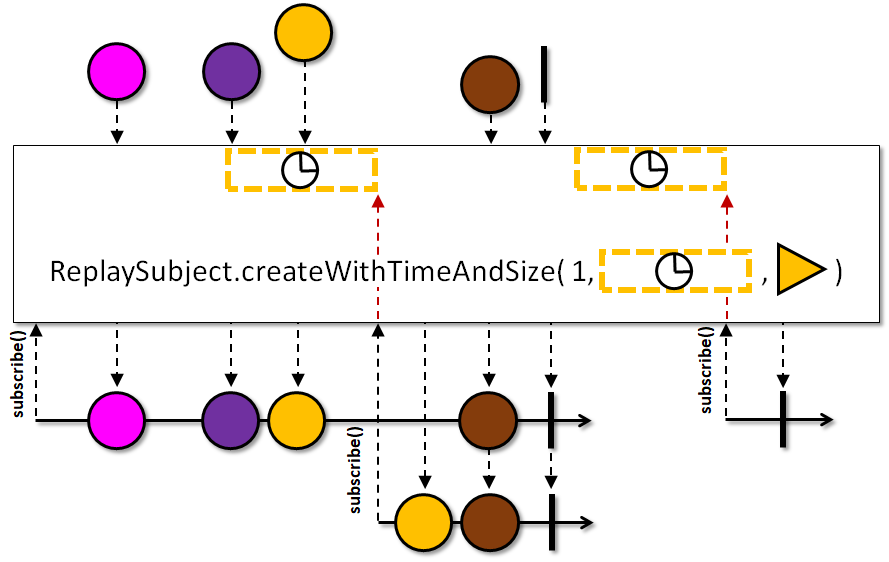
Since a Subject is conceptionally derived from the Processor type in the Reactive Streams specification,
nulls are not allowed (Rule 2.13) as
parameters to onNext(Object) and onError(Throwable). Such calls will result in a
NullPointerException being thrown and the subject's state is not changed.
Since a ReplaySubject is an Observable, it does not support backpressure.
When this ReplaySubject is terminated via onError(Throwable) or onComplete(),
late Observers will receive the retained/cached items first (if any) followed by the respective
terminal event. If the ReplaySubject has a time-bound, the age of the retained/cached items are still considered
when replaying and thus it may result in no items being emitted before the terminal event.
Once an Observer has subscribed, it will receive items continuously from that point on. Bounds only affect how
many past items a new Observer will receive before it catches up with the live event feed.
Even though ReplaySubject implements the Observer interface, calling
onSubscribe is not required (Rule 2.12)
if the subject is used as a standalone source. However, calling onSubscribe
after the ReplaySubject reached its terminal state will result in the
given Disposable being disposed immediately.
Calling onNext(Object), onError(Throwable) and onComplete()
is required to be serialized (called from the same thread or called non-overlappingly from different threads
through external means of serialization). The Subject.toSerialized() method available to all Subjects
provides such serialization and also protects against reentrance (i.e., when a downstream Observer
consuming this subject also wants to call onNext(Object) on this subject recursively).
This ReplaySubject supports the standard state-peeking methods hasComplete(), hasThrowable(),
getThrowable() and hasObservers() as well as means to read the retained/cached items
in a non-blocking and thread-safe manner via hasValue(), getValue(),
getValues() or getValues(Object[]).
Note that due to concurrency requirements, a size- and time-bounded ReplaySubject may hold strong references to more
source emissions than specified while it isn't terminated yet. Use the cleanupBuffer() to allow
such inaccessible items to be cleaned up by GC once no consumer references it anymore.
- Scheduler:
ReplaySubjectdoes not operate by default on a particularSchedulerand theObservers get notified on the thread the respectiveonXXXmethods were invoked. Time-boundReplaySubjects use the givenSchedulerin theircreatemethods as time source to timestamp of items received for the age checks.- Error handling:
- When the
onError(Throwable)is called, theReplaySubjectenters into a terminal state and emits the sameThrowableinstance to the last set ofObservers. During this emission, if one or moreObservers dispose their respectiveDisposables, theThrowableis delivered to the global error handler viaRxJavaPlugins.onError(Throwable)(multiple times if multipleObservers cancel at once). If there were noObservers subscribed to thisReplaySubjectwhen theonError()was called, the global error handler is not invoked.
Example usage:
 ReplaySubject<Object> subject = ReplaySubject.create();
 subject.onNext("one");
 subject.onNext("two");
 subject.onNext("three");
 subject.onComplete();

 // both of the following will get the onNext/onComplete calls from above
 subject.subscribe(observer1);
 subject.subscribe(observer2);
-
Method Summary
Modifier and TypeMethodDescriptionvoidMakes sure the item cached by the head node in a bounded ReplaySubject is released (as it is never part of a replay).static <T> @NonNull ReplaySubject<T> create()Creates an unbounded replay subject.static <T> @NonNull ReplaySubject<T> create(int capacityHint) Creates an unbounded replay subject with the specified initial buffer capacity.static <T> @NonNull ReplaySubject<T> createWithSize(int maxSize) Creates a size-bounded replay subject.static <T> @NonNull ReplaySubject<T> createWithTime(long maxAge, @NonNull TimeUnit unit, @NonNull Scheduler scheduler) Creates a time-bounded replay subject.static <T> @NonNull ReplaySubject<T> createWithTimeAndSize(long maxAge, @NonNull TimeUnit unit, @NonNull Scheduler scheduler, int maxSize) Creates a time- and size-bounded replay subject.Returns the error that caused the Subject to terminate or null if the Subject hasn't terminated yet.getValue()Returns a single value the Subject currently has or null if no such value exists.Object[]Returns an Object array containing snapshot all values of the Subject.T[]Returns a typed array containing a snapshot of all values of the Subject.booleanReturns true if the subject has reached a terminal state through a complete event.booleanReturns true if the subject has any Observers.booleanReturns true if the subject has reached a terminal state through an error event.booleanhasValue()Returns true if the subject has any value.voidNotifies theObserverthat theObservablehas finished sending push-based notifications.voidNotifies theObserverthat theObservablehas experienced an error condition.voidProvides theObserverwith a new item to observe.voidProvides theObserverwith the means of cancelling (disposing) the connection (channel) with theObservablein both synchronous (from withinObserver.onNext(Object)) and asynchronous manner.protected voidsubscribeActual(Observer<? super T> observer) Operator implementations (both source and intermediate) should implement this method that performs the necessary business logic and handles the incomingObservers.Methods inherited from class Subject
toSerializedMethods inherited from class Observable
all, amb, ambArray, ambWith, any, blockingFirst, blockingFirst, blockingForEach, blockingForEach, blockingIterable, blockingIterable, blockingLast, blockingLast, blockingLatest, blockingMostRecent, blockingNext, blockingSingle, blockingSingle, blockingStream, blockingStream, blockingSubscribe, blockingSubscribe, blockingSubscribe, blockingSubscribe, blockingSubscribe, buffer, buffer, buffer, buffer, buffer, buffer, buffer, buffer, buffer, buffer, buffer, buffer, buffer, buffer, buffer, buffer, buffer, bufferSize, cache, cacheWithInitialCapacity, cast, collect, collect, collectInto, combineLatest, combineLatest, combineLatest, combineLatest, combineLatest, combineLatest, combineLatest, combineLatest, combineLatest, combineLatest, combineLatestArray, combineLatestArray, combineLatestArrayDelayError, combineLatestArrayDelayError, combineLatestDelayError, combineLatestDelayError, compose, concat, concat, concat, concat, concat, concat, concatArray, concatArrayDelayError, concatArrayEager, concatArrayEager, concatArrayEagerDelayError, concatArrayEagerDelayError, concatDelayError, concatDelayError, concatDelayError, concatEager, concatEager, concatEager, concatEager, concatEagerDelayError, concatEagerDelayError, concatEagerDelayError, concatEagerDelayError, concatMap, concatMap, concatMap, concatMapCompletable, concatMapCompletable, concatMapCompletableDelayError, concatMapCompletableDelayError, concatMapCompletableDelayError, concatMapDelayError, concatMapDelayError, concatMapDelayError, concatMapEager, concatMapEager, concatMapEagerDelayError, concatMapEagerDelayError, concatMapIterable, concatMapMaybe, concatMapMaybe, concatMapMaybeDelayError, concatMapMaybeDelayError, concatMapMaybeDelayError, concatMapSingle, concatMapSingle, concatMapSingleDelayError, concatMapSingleDelayError, concatMapSingleDelayError, concatMapStream, concatWith, concatWith, concatWith, concatWith, contains, count, create, debounce, debounce, debounce, debounce, defaultIfEmpty, defer, delay, delay, delay, delay, delay, delay, delaySubscription, delaySubscription, delaySubscription, dematerialize, distinct, distinct, distinct, distinctUntilChanged, distinctUntilChanged, distinctUntilChanged, doAfterNext, doAfterTerminate, doFinally, doOnComplete, doOnDispose, doOnEach, doOnEach, doOnError, doOnLifecycle, doOnNext, doOnSubscribe, doOnTerminate, elementAt, elementAt, elementAtOrError, empty, error, error, filter, first, firstElement, firstOrError, firstOrErrorStage, firstStage, flatMap, flatMap, flatMap, flatMap, flatMap, flatMap, flatMap, flatMap, flatMap, flatMap, flatMap, flatMap, flatMapCompletable, flatMapCompletable, flatMapIterable, flatMapIterable, flatMapMaybe, flatMapMaybe, flatMapSingle, flatMapSingle, flatMapStream, forEach, forEachWhile, forEachWhile, forEachWhile, fromAction, fromArray, fromCallable, fromCompletable, fromCompletionStage, fromFuture, fromFuture, fromIterable, fromMaybe, fromOptional, fromPublisher, fromRunnable, fromSingle, fromStream, fromSupplier, generate, generate, generate, generate, generate, groupBy, groupBy, groupBy, groupBy, groupBy, groupJoin, hide, ignoreElements, interval, interval, interval, interval, intervalRange, intervalRange, isEmpty, join, just, just, just, just, just, just, just, just, just, just, last, lastElement, lastOrError, lastOrErrorStage, lastStage, lift, map, mapOptional, materialize, merge, merge, merge, merge, merge, merge, merge, merge, mergeArray, mergeArray, mergeArrayDelayError, mergeArrayDelayError, mergeDelayError, mergeDelayError, mergeDelayError, mergeDelayError, mergeDelayError, mergeDelayError, mergeDelayError, mergeDelayError, mergeWith, mergeWith, mergeWith, mergeWith, never, observeOn, observeOn, observeOn, ofType, onErrorComplete, onErrorComplete, onErrorResumeNext, onErrorResumeWith, onErrorReturn, onErrorReturnItem, onTerminateDetach, publish, publish, range, rangeLong, reduce, reduce, reduceWith, repeat, repeat, repeatUntil, repeatWhen, replay, replay, replay, replay, replay, replay, replay, replay, replay, replay, replay, replay, replay, replay, replay, replay, replay, replay, retry, retry, retry, retry, retry, retryUntil, retryWhen, safeSubscribe, sample, sample, sample, sample, sample, sample, sample, scan, scan, scanWith, sequenceEqual, sequenceEqual, sequenceEqual, sequenceEqual, serialize, share, single, singleElement, singleOrError, singleOrErrorStage, singleStage, skip, skip, skip, skipLast, skipLast, skipLast, skipLast, skipLast, skipLast, skipUntil, skipWhile, sorted, sorted, startWith, startWith, startWith, startWith, startWithArray, startWithItem, startWithIterable, subscribe, subscribe, subscribe, subscribe, subscribe, subscribe, subscribeOn, subscribeWith, switchIfEmpty, switchMap, switchMap, switchMapCompletable, switchMapCompletableDelayError, switchMapDelayError, switchMapDelayError, switchMapMaybe, switchMapMaybeDelayError, switchMapSingle, switchMapSingleDelayError, switchOnNext, switchOnNext, switchOnNextDelayError, switchOnNextDelayError, take, take, take, takeLast, takeLast, takeLast, takeLast, takeLast, takeLast, takeLast, takeLast, takeLast, takeUntil, takeUntil, takeWhile, test, test, throttleFirst, throttleFirst, throttleFirst, throttleLast, throttleLast, throttleLast, throttleLatest, throttleLatest, throttleLatest, throttleLatest, throttleLatest, throttleWithTimeout, throttleWithTimeout, throttleWithTimeout, timeInterval, timeInterval, timeInterval, timeInterval, timeout, timeout, timeout, timeout, timeout, timeout, timeout, timeout, timer, timer, timestamp, timestamp, timestamp, timestamp, to, toFlowable, toFuture, toList, toList, toList, toMap, toMap, toMap, toMultimap, toMultimap, toMultimap, toMultimap, toSortedList, toSortedList, toSortedList, toSortedList, unsafeCreate, unsubscribeOn, using, using, window, window, window, window, window, window, window, window, window, window, window, window, window, window, window, window, window, withLatestFrom, withLatestFrom, withLatestFrom, withLatestFrom, withLatestFrom, withLatestFrom, wrap, zip, zip, zip, zip, zip, zip, zip, zip, zip, zip, zip, zip, zipArray, zipWith, zipWith, zipWith, zipWith
-
Method Details
-
create
Creates an unbounded replay subject.The internal buffer is backed by an
ArrayListand starts with an initial capacity of 16. Once the number of items reaches this capacity, it will grow as necessary (usually by 50%). However, as the number of items grows, this causes frequent array reallocation and copying, and may hurt performance and latency. This can be avoided with thecreate(int)overload which takes an initial capacity parameter and can be tuned to reduce the array reallocation frequency as needed.- Type Parameters:
T- the type of items observed and emitted by the Subject- Returns:
- the created subject
-
create
Creates an unbounded replay subject with the specified initial buffer capacity.Use this method to avoid excessive array reallocation while the internal buffer grows to accommodate new items. For example, if you know that the buffer will hold 32k items, you can ask the
ReplaySubjectto preallocate its internal array with a capacity to hold that many items. Once the items start to arrive, the internal array won't need to grow, creating less garbage and no overhead due to frequent array-copying.- Type Parameters:
T- the type of items observed and emitted by the Subject- Parameters:
capacityHint- the initial buffer capacity- Returns:
- the created subject
- Throws:
IllegalArgumentException- ifcapacityHintis non-positive
-
createWithSize
Creates a size-bounded replay subject.In this setting, the
ReplaySubjectholds at mostsizeitems in its internal buffer and discards the oldest item.When observers subscribe to a terminated
ReplaySubject, they are guaranteed to see at mostsizeonNextevents followed by a termination event.If an observer subscribes while the
ReplaySubjectis active, it will observe all items in the buffer at that point in time and each item observed afterwards, even if the buffer evicts items due to the size constraint in the mean time. In other words, once an Observer subscribes, it will receive items without gaps in the sequence.- Type Parameters:
T- the type of items observed and emitted by the Subject- Parameters:
maxSize- the maximum number of buffered items- Returns:
- the created subject
- Throws:
IllegalArgumentException- ifmaxSizeis non-positive
-
createWithTime
@CheckReturnValue @NonNull public static <T> @NonNull ReplaySubject<T> createWithTime(long maxAge, @NonNull @NonNull TimeUnit unit, @NonNull @NonNull Scheduler scheduler) Creates a time-bounded replay subject.In this setting, the
ReplaySubjectinternally tags each observed item with a timestamp value supplied by theSchedulerand keeps only those whose age is less than the supplied time value converted to milliseconds. For example, an item arrives at T=0 and the max age is set to 5; at T>=5 this first item is then evicted by any subsequent item or termination event, leaving the buffer empty.Once the subject is terminated, observers subscribing to it will receive items that remained in the buffer after the terminal event, regardless of their age.
If an observer subscribes while the
ReplaySubjectis active, it will observe only those items from within the buffer that have an age less than the specified time, and each item observed thereafter, even if the buffer evicts items due to the time constraint in the mean time. In other words, once an observer subscribes, it observes items without gaps in the sequence except for any outdated items at the beginning of the sequence.Note that terminal notifications (
onErrorandonComplete) trigger eviction as well. For example, with a max age of 5, the first item is observed at T=0, then anonCompletenotification arrives at T=10. If an observer subscribes at T=11, it will find an emptyReplaySubjectwith just anonCompletenotification.- Type Parameters:
T- the type of items observed and emitted by the Subject- Parameters:
maxAge- the maximum age of the contained itemsunit- the time unit oftimescheduler- theSchedulerthat provides the current time- Returns:
- the created subject
- Throws:
NullPointerException- ifunitorschedulerisnullIllegalArgumentException- ifmaxAgeis non-positive
-
createWithTimeAndSize
@CheckReturnValue @NonNull public static <T> @NonNull ReplaySubject<T> createWithTimeAndSize(long maxAge, @NonNull @NonNull TimeUnit unit, @NonNull @NonNull Scheduler scheduler, int maxSize) Creates a time- and size-bounded replay subject.In this setting, the
ReplaySubjectinternally tags each received item with a timestamp value supplied by theSchedulerand holds at mostsizeitems in its internal buffer. It evicts items from the start of the buffer if their age becomes less-than or equal to the supplied age in milliseconds or the buffer reaches itssizelimit.When observers subscribe to a terminated
ReplaySubject, they observe the items that remained in the buffer after the terminal notification, regardless of their age, but at mostsizeitems.If an observer subscribes while the
ReplaySubjectis active, it will observe only those items from within the buffer that have age less than the specified time and each subsequent item, even if the buffer evicts items due to the time constraint in the mean time. In other words, once an observer subscribes, it observes items without gaps in the sequence except for the outdated items at the beginning of the sequence.Note that terminal notifications (
onErrorandonComplete) trigger eviction as well. For example, with a max age of 5, the first item is observed at T=0, then anonCompletenotification arrives at T=10. If an observer subscribes at T=11, it will find an emptyReplaySubjectwith just anonCompletenotification.- Type Parameters:
T- the type of items observed and emitted by the Subject- Parameters:
maxAge- the maximum age of the contained itemsunit- the time unit oftimescheduler- theSchedulerthat provides the current timemaxSize- the maximum number of buffered items- Returns:
- the created subject
- Throws:
NullPointerException- ifunitorschedulerisnullIllegalArgumentException- ifmaxAgeormaxSizeis non-positive
-
subscribeActual
Description copied from class:ObservableOperator implementations (both source and intermediate) should implement this method that performs the necessary business logic and handles the incomingObservers.There is no need to call any of the plugin hooks on the current
Observableinstance or theObserver; all hooks and basic safeguards have been applied byObservable.subscribe(Observer)before this method gets called.- Specified by:
subscribeActualin classObservable<T>- Parameters:
observer- the incomingObserver, nevernull
-
onSubscribe
Description copied from interface:ObserverProvides theObserverwith the means of cancelling (disposing) the connection (channel) with theObservablein both synchronous (from withinObserver.onNext(Object)) and asynchronous manner.- Parameters:
d- theDisposableinstance whoseDisposable.dispose()can be called anytime to cancel the connection
-
onNext
Description copied from interface:ObserverProvides theObserverwith a new item to observe.The
Observablemay call this method 0 or more times.The
Observablewill not call this method again after it calls eitherObserver.onComplete()orObserver.onError(Throwable).- Parameters:
t- the item emitted by the Observable
-
onError
Description copied from interface:ObserverNotifies theObserverthat theObservablehas experienced an error condition.If the
Observablecalls this method, it will not thereafter callObserver.onNext(T)orObserver.onComplete().- Parameters:
t- the exception encountered by the Observable
-
onComplete
public void onComplete()Description copied from interface:ObserverNotifies theObserverthat theObservablehas finished sending push-based notifications.The
Observablewill not call this method if it callsObserver.onError(Throwable). -
hasObservers
Description copied from class:SubjectReturns true if the subject has any Observers.The method is thread-safe.
- Specified by:
hasObserversin classSubject<T>- Returns:
- true if the subject has any Observers
-
getThrowable
Description copied from class:SubjectReturns the error that caused the Subject to terminate or null if the Subject hasn't terminated yet.The method is thread-safe.
- Specified by:
getThrowablein classSubject<T>- Returns:
- the error that caused the Subject to terminate or null if the Subject hasn't terminated yet
-
getValue
Returns a single value the Subject currently has or null if no such value exists.The method is thread-safe.
- Returns:
- a single value the Subject currently has or null if no such value exists
-
cleanupBuffer
public void cleanupBuffer()Makes sure the item cached by the head node in a bounded ReplaySubject is released (as it is never part of a replay).By default, live bounded buffers will remember one item before the currently receivable one to ensure subscribers can always receive a continuous sequence of items. A terminated ReplaySubject automatically releases this inaccessible item.
The method must be called sequentially, similar to the standard
onXXXmethods.History: 2.1.11 - experimental
- Since:
- 2.2
-
getValues
Returns an Object array containing snapshot all values of the Subject.The method is thread-safe.
- Returns:
- the array containing the snapshot of all values of the Subject
-
getValues
Returns a typed array containing a snapshot of all values of the Subject.The method follows the conventions of Collection.toArray by setting the array element after the last value to null (if the capacity permits).
The method is thread-safe.
- Parameters:
array- the target array to copy values into if it fits- Returns:
- the given array if the values fit into it or a new array containing all values
-
hasComplete
Description copied from class:SubjectReturns true if the subject has reached a terminal state through a complete event.The method is thread-safe.
- Specified by:
hasCompletein classSubject<T>- Returns:
- true if the subject has reached a terminal state through a complete event
- See Also:
-
hasThrowable
Description copied from class:SubjectReturns true if the subject has reached a terminal state through an error event.The method is thread-safe.
- Specified by:
hasThrowablein classSubject<T>- Returns:
- true if the subject has reached a terminal state through an error event
- See Also:
-
hasValue
Returns true if the subject has any value.The method is thread-safe.
- Returns:
- true if the subject has any value
-